The brief no AWS engineer wants to receive
Four weeks before the launch, the Head of Product dropped the message into our Slack channel: "Marketing has confirmed the PR campaign. We're expecting 50× our normal traffic on launch day. The feature needs to be live. It needs to hold."
Normal load for this service is approximately 800 RPS - steady, well-understood, already running in production for eighteen months. The launch campaign involved a coordinated media push timed to a public announcement, and the traffic model was not theoretical: previous campaigns for similar products in this category had generated exactly this kind of sudden, sustained spike. The question was not whether 50× was realistic. The question was whether our architecture would survive it.
The architecture had been extended over the previous three months to support the new feature. It was primarily serverless - API Gateway fronting a Lambda processing layer, DynamoDB for the primary data store, SQS for async job dispatch, and Aurora Serverless v2 for relational queries on reporting data. There was a CloudFront distribution in front of the static assets. Nothing exotic. Exactly the kind of architecture that gets built incrementally and works well until it doesn't.
None of the architecture decisions made over the previous three months had ever been validated under anything more than 2× load. The unit tests passed. The staging environment had been load-tested at 1,200 RPS. The assumption was that serverless would "scale automatically." That assumption had never been tested at 50× - and at 50× with serverless, a lot of things that scale automatically also fail automatically.
The standard response to this situation is to run a load test against a staging environment. In this case, that would have been the right second step. But load testing requires a deployed environment with the correct configuration, and the correct configuration - under a traffic profile we had never modelled before - was precisely what we didn't know. We needed to find the architectural failure modes first, before provisioning anything for a test.
This is where pinpole changed the workflow. Instead of deploying first and discovering problems in a staging load test, we simulated first - on the canvas, against the actual architecture, at the actual expected traffic profile. What we found in that session is what this case study is about.
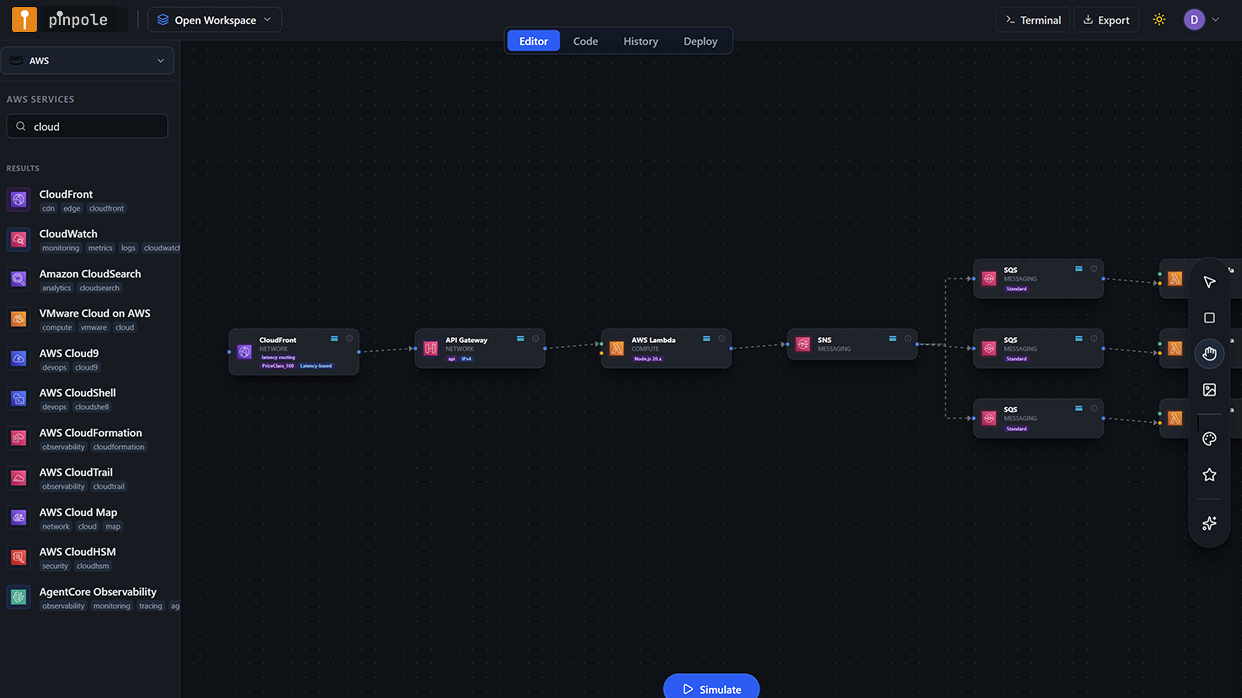
The architecture under analysis
The service processes user-submitted content: a CloudFront distribution handles static delivery; API Gateway manages authentication and routing; a primary Lambda function validates input, writes to DynamoDB, and dispatches async jobs to SQS; a secondary Lambda worker function processes those jobs and writes results to Aurora Serverless v2 for reporting queries; a third Lambda function handles reporting API calls against Aurora. The architecture is entirely on-demand - no EC2, no containers, no manually scaled pools.
On a normal day, this is exactly the right architecture. Lambda scales automatically with invocation concurrency; DynamoDB on-demand absorbs variable read/write patterns; SQS decouples the processing pipeline from the intake path. At 800 RPS, this architecture performs well and costs approximately $1,850 per month in AWS charges.
At 40,000 RPS, a number of things that look like strengths at 800 RPS become failure modes. Simulating it in pinpole before touching any infrastructure revealed four of them in a single 45-minute session.
Setting up the simulation
Canvas reconstruction from production
The architecture was already partially mapped in pinpole from earlier simulations. The new Lambda functions and SQS queues added over the previous three months were added to the canvas, with service configuration updated to match production settings: Lambda memory at 512 MB, 15-second timeout on the processor function, 900-second timeout on the worker, DynamoDB table set to on-demand capacity mode, Aurora ACU min/max set to 2/64.
Baseline simulation - 800 RPS constant
Ran the baseline first to establish a clean reference. Constant traffic pattern at 800 RPS for five minutes. All services performed within expected parameters. Cost estimate: $1,850/month. No AI warnings generated. This is the architecture's normal operating state - validated, not assumed.
Launch-day simulation - Spike pattern to 40,000 RPS
The Spike traffic pattern was selected: 800 RPS baseline, ramping to 40,000 RPS over 90 seconds (matching the expected media campaign timing), sustained at 40,000 RPS for 10 minutes, then decaying back over 5 minutes. This is the canonical launch-day traffic shape - a sudden, steep, sustained peak followed by a gradual normalisation.
recommendations applied and re-simulated
After the first spike simulation surfaced findings, recommendations were reviewed, selected, and applied to the canvas. A second spike simulation was run on the modified architecture to validate that the recommendations resolved the identified failure modes and to capture the revised cost projection.
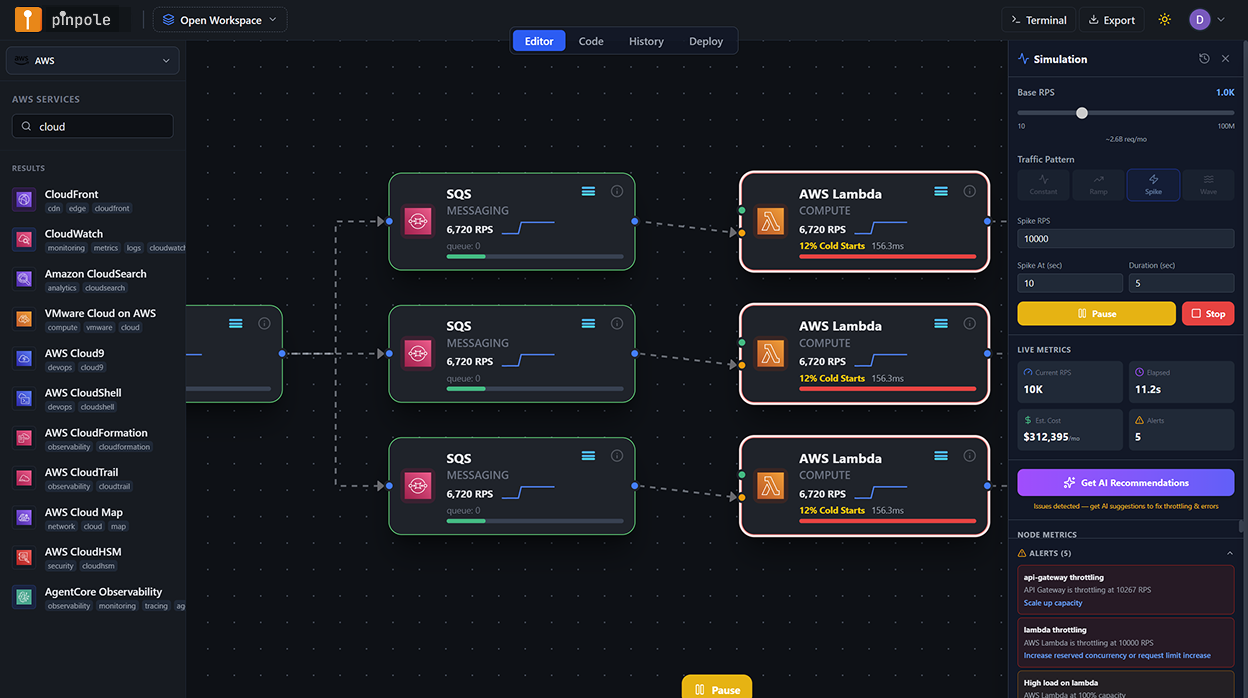
What the simulation found
The spike simulation completed in under three minutes and surfaced four significant findings, each flagged at different severity levels in the per-node results panel. Two were classified as CRITICAL - meaning the simulation projected cascading service degradation or hard failure under the target load. One was a WARNING. One was an AI-only recommendation that did not produce a direct error but represented a significant cost exposure.
Lambda concurrency ceiling hit at ~28,000 RPS - 503 cascade begins
The primary processor Lambda function had a reserved concurrency of 500 (set months earlier to prevent runaway execution costs in a different context). At 28,000 RPS, the simulation projected this ceiling being reached, after which new invocations would be throttled with a 429 response from Lambda - which API Gateway converts to a 503 for the caller. At 40,000 RPS, the simulation estimated approximately 30% of requests would be throttled at peak. The reserved concurrency setting was a defensive configuration that had become a launch blocker - completely invisible in any tool that didn't simulate the traffic profile against the actual service configuration.
API Gateway account-level burst limit trips at peak ramp
API Gateway imposes a default burst limit of 5,000 requests per second per account (adjustable via service quota increase request, but not automatic). The simulation showed this limit being exceeded during the 90-second ramp phase as traffic crossed 5,000 RPS - before the architecture had even reached its 40,000 RPS peak. Requests above the burst limit return 429 errors directly from API Gateway, before any Lambda invocation occurs. This is a well-documented AWS constraint, but it requires knowing your peak RPS target before deploying - exactly the information a simulation provides that a static architecture review does not.
DynamoDB on-demand burst capacity exhausted - read throttling after 30 minutes
DynamoDB on-demand capacity mode provisions burst capacity that can absorb sudden traffic increases, but this burst pool has limits. The simulation modelled the burst capacity depletion curve: at 40,000 RPS sustained for more than approximately 30 minutes, the table's burst pool would be exhausted and DynamoDB would begin returning ProvisionedThroughputExceeded errors on reads. For a 10-minute peak this may not materialise - but if the launch traffic was sustained longer than projected (as campaigns often are), this would compound with the Lambda throttling scenario to degrade the service progressively over time.
No caching layer - read amplification against DynamoDB and Aurora under spike
The architecture had no ElastiCache layer. Under normal load, DynamoDB handles reads efficiently. Under 50× spike with read-heavy traffic patterns (users viewing product pages, reading content, fetching status data), the simulation projected significant read amplification - many concurrent users reading the same popular items, each generating a DynamoDB or Aurora read. The recommendation engine flagged that adding ElastiCache (Redis) between Lambda and both DynamoDB and Aurora would reduce read load on both stores by an estimated 70–80% under the launch traffic profile, reducing both throttling risk and cost substantially.
What we would not have caught without simulation
It is worth being precise about which of these findings would have been caught by other means, and which would not.
Lambda reserved concurrency - would not have been caught
The reserved concurrency setting was legitimate defensive configuration from an earlier context. It was not on any checklist. It does not appear in cost estimates. It is invisible to Cloudcraft, Brainboard, and draw.io. A staging load test at 1,200 RPS would not have triggered it. It would have been discovered at approximately 28,000 RPS on launch day.
API Gateway burst limit - might have been caught
This is a known AWS constraint, and an experienced engineer reviewing the architecture might have flagged it as a risk. But "might" is doing a lot of work. Without a specific RPS target to reason against, it is easy to note the limit without quantifying whether it applies. Simulation eliminates the ambiguity by modelling the actual request rate against the actual limit and reporting the exact RPS at which the failure occurs.
DynamoDB burst depletion - partially catchable
An engineer who had researched DynamoDB on-demand burst behaviour in depth might have flagged this as a risk at 50× load. In practice, DynamoDB burst capacity is one of the more poorly documented AWS behaviours, and the threshold at which it matters depends on traffic shape and duration in ways that are difficult to reason about without a simulation model. It would have required specific expertise and deliberate research to surface in an architecture review.
Missing ElastiCache - catchable but typically skipped
A thorough architecture review for a launch might have recommended a caching layer. In practice, the recommendation requires someone to raise it and quantify the benefit. The recommendation in pinpole did both - surfaced the gap and provided an estimated cost saving that made the case immediately. Without that number, it is easy to deprioritise as optional.
The honest summary: one of the four findings would probably have been caught by a diligent architecture review. Two were sufficiently obscure or traffic-profile-dependent that they would likely only have appeared in staging or production load testing. One would have been discovered in production at approximately 28,000 RPS on launch day, with the public watching.
Applying the recommendations
The simulation surfaced the findings. The recommendations surfaced the fixes. Each finding in the results panel had a corresponding recommendation, each of which could be reviewed before being applied to the canvas with a single action.
Lambda processor - remove reserved concurrency restriction
The recommendation was to remove the reserved concurrency cap entirely for the processor function and instead rely on account-level concurrency limits for throttle protection, with Lambda Provisioned Concurrency added for the first 500 instances to eliminate cold starts at launch ramp. Applied to canvas, service configuration panel updated.
API Gateway - service quota increase and usage plan configuration
The recommendation flagged that a service quota increase request for API Gateway burst limit (from 5,000 to 15,000 RPS) needs to be submitted to AWS at least 5 business days before launch - creating a real calendar dependency that would not have appeared in any architecture review document. A throttling usage plan was also added to the canvas configuration to provide graceful degradation behaviour for requests above the sustained limit.
DynamoDB - switch high-read tables to provisioned capacity with auto-scaling
For the two tables that serve the highest read volume, the recommendation was to switch from on-demand to provisioned capacity with auto-scaling configured. This eliminates burst depletion risk on sustained load and substantially reduces per-read cost at high RPS. The recommendation included specific capacity targets (12,000 RCU/sec baseline, auto-scaling to 60,000) based on the simulated traffic profile.
ElastiCache Redis - added between Lambda and data stores
A Redis cluster (r7g.large, single-AZ for launch, with Multi-AZ for the production steady state) was added to the canvas as a caching layer. TTL configuration was set to 60 seconds for content data, 300 seconds for reporting aggregates. The canvas connection was drawn Lambda → ElastiCache → DynamoDB, with the compatibility validator confirming the connection directions were correct.
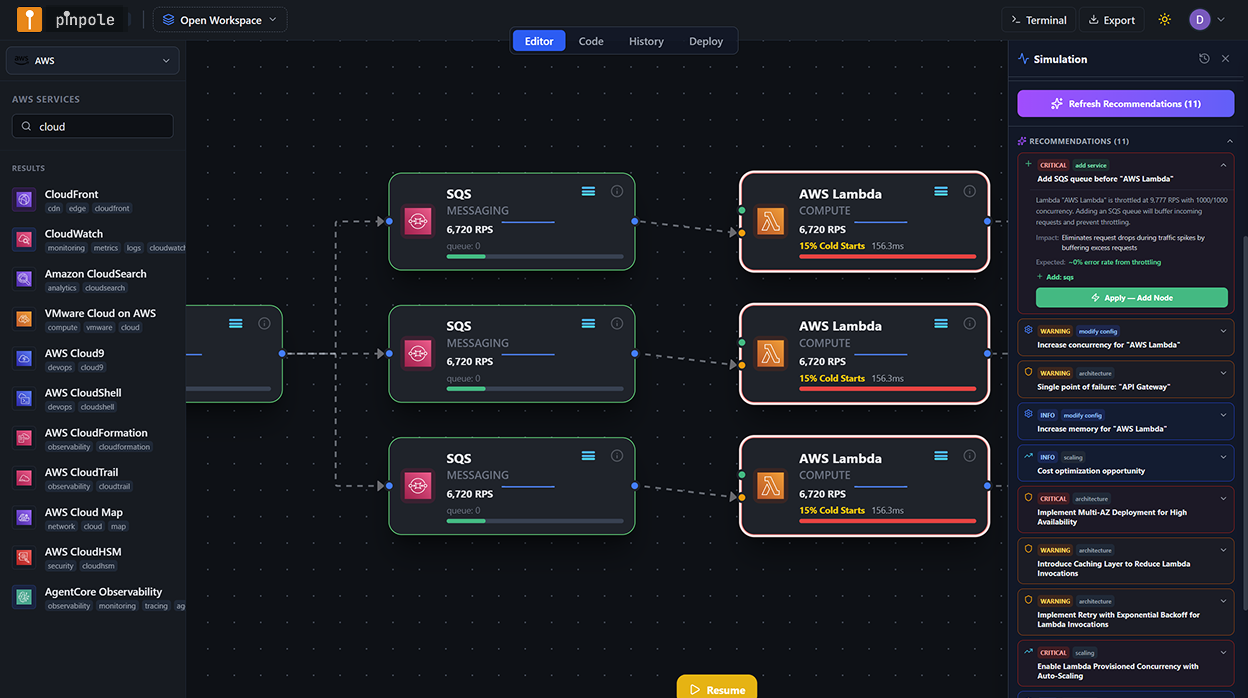
Re-simulation: validating the fixes
With all four recommendations applied to the canvas, the spike simulation was run a second time at identical parameters - 40,000 RPS peak, same traffic shape. The results were the operational validation that the fixes were not just plausible but modelled as effective under the target load.
Lambda processor: no throttling below 45,000 RPS (buffer above target). API Gateway: quota increase marked as a pre-launch action item with 5-day lead time dependency captured. DynamoDB: no burst depletion projected at peak or beyond. ElastiCache: read load on DynamoDB reduced by 76% at 40,000 RPS peak. No CRITICAL or WARNING findings in the re-simulation. Three AI informational recommendations remained (minor optimizations, not blockers).
The re-simulation also produced the revised cost projection that was used in the launch planning discussion with the Head of Engineering: $12,400 per month at 40,000 RPS sustained, versus the $41,800 projection from the unoptimized architecture. The $29,400 difference per month is a downstream consequence of the ElastiCache addition reducing DynamoDB read costs, and the provisioned capacity switch eliminating on-demand read cost amplification at peak.
Cost impact: the full picture
The cost delta between the original architecture and the optimized architecture at 40,000 RPS is a direct output of the simulation and recommendations. These are not estimates - they are the per-service cost projections from pinpole's cost model at the simulated RPS level.
| Service | Original config | Optimised config | Cost at 40K RPS (before) | Cost at 40K RPS (after) | Monthly saving |
|---|---|---|---|---|---|
| Lambda (processor) | 512 MB, reserved concurrency 500 | 512 MB, no reserved cap + Provisioned Concurrency 500 | $4,100 | $5,200 | −$1,100 (cost up, but failure eliminated) |
| API Gateway | Default burst limit 5,000 RPS | Quota increase to 15,000 RPS + usage plan | $6,800 | $6,800 | $0 (no cost change) |
| DynamoDB (content tables) | On-demand capacity | Provisioned, auto-scaling 12K–60K RCU | $22,400 | $4,200 | $18,200 |
| ElastiCache Redis | Not present | r7g.large, single-AZ | $0 | $380 | −$380 (new cost) |
| Aurora Serverless v2 | 2–64 ACU, no cache | 2–64 ACU + read cache via ElastiCache | $7,200 | $1,620 | $5,580 |
| CloudFront + data transfer | Standard config | No change | $1,300 | $1,300 | $0 |
| Total | $41,800/mo | $12,400/mo | $29,400/mo |
The Lambda cost increase (provisioned concurrency has a standing charge vs. fully on-demand) is real, and was accepted as the correct trade-off: eliminating cold starts on the launch ramp is operationally essential, and the $1,100/month is a fraction of the DynamoDB and Aurora savings that come with the ElastiCache addition.
Launch preparation ROI - pinpole simulation session
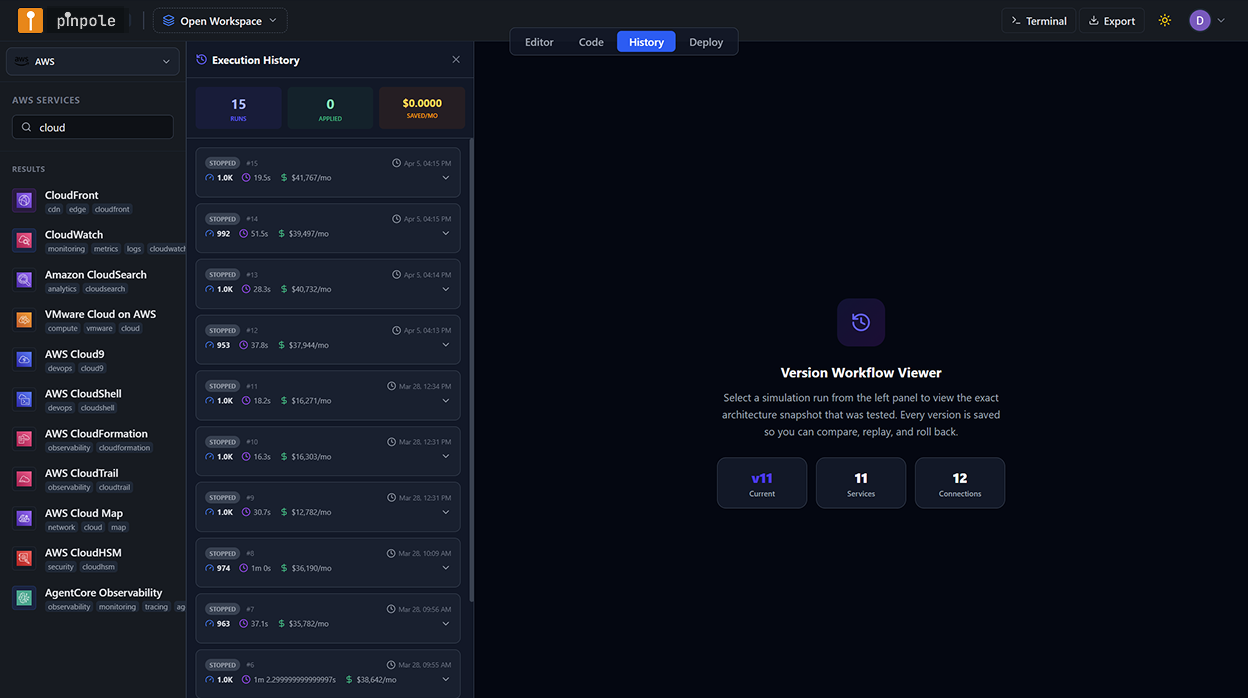
Execution history as launch documentation
After the session, every simulation run - the baseline, the initial spike with four findings, the re-simulation of the optimized architecture - was preserved in pinpole's execution history. Each entry contains the architecture snapshot at the time of the run, the traffic parameters, the per-node metrics output, the recommendations that were applied, and the cost estimate.
This became the primary documentation artefact for the launch architecture review. The product and engineering leads could open the execution history and step through the decision trail: here is the architecture before the simulation; here are the four things the simulation found; here are the recommendations that were applied; here is the re-simulation that validated the fixes. The case for the architecture changes was made not through a PowerPoint or a Confluence page but through a replay of the simulation session itself.
From canvas to production - the deployment path
With the architecture validated in simulation, the deployment followed the standard pinpole workflow: the canvas was exported as Terraform, reviewed by the team in a pull request with the simulation execution history attached as context, deployed to the ST environment for integration testing, then to UAT for the pre-launch load test at 10,000 RPS, then to production five days before the launch date - leaving time for the API Gateway quota increase (submitted the day after the simulation session) to be processed.
The staged deployment also confirmed the Provisioned Concurrency initialisation behaviour on the Lambda function: the 500 provisioned instances were warm and ready before the launch traffic began, eliminating the cold start spike that would have been visible in the Lambda metrics at ramp-up otherwise.
The simulation didn't replace the load test. What it did was make the load test pass the first time. The architecture that went into staging was the architecture that had already been stress-tested at 40,000 RPS in the design environment. The staging load test was validation, not discovery.
Launch day
Traffic hit 41,200 RPS at the peak of the launch window - slightly above the 40,000 RPS simulation target. The architecture held. Lambda concurrency peaked at 1,247 concurrent executions - well below the account limit, with headroom. API Gateway returned zero 429s from the burst limit; the quota increase had been processed four days before launch. DynamoDB RCU consumption tracked the provisioned capacity auto-scaling curve correctly. ElastiCache cache hit rate was 81% at peak. Aurora ACU scaled to 28 without any query latency degradation.
The CloudWatch dashboard showed the launch ramp, peak, and decay exactly as the simulation had modelled it. There was nothing surprising in the metrics. The simulation had been accurate enough to produce a CloudWatch dashboard that looked like a replay of the pinpole output.
Zero user-facing errors attributable to infrastructure during the launch window. p99 latency stayed below 180ms throughout the peak period. AWS bill for launch week: $3,100 (within $200 of the pinpole cost projection for the 7-day period at modelled traffic shape). The Head of Product's message in Slack the morning after: "Not a single complaint about performance. First time that's happened at a launch."
What this means for launch architecture practice
The pattern I now follow for any significant product launch or traffic event is fixed. It starts four to six weeks before the launch date - not to perform a static architecture review, but to run the launch traffic profile through a pinpole simulation and establish a simulation-validated architecture as the deployment target.
The lead-time dependency surfaced by this process is often the most valuable deliverable before any code is written: service quota increases, Provisioned Concurrency reservation, DynamoDB capacity planning, caching layer sizing - all of these have lead times or cost implications that need to be known before the launch calendar is set. Simulation makes those dependencies visible before they become blockers.
The second value is the cost projection at launch-traffic levels. Engineering teams routinely underestimate AWS costs under spike conditions because their cost models are built on average-load assumptions. The simulation produces a cost estimate at the actual expected peak - and in my experience, the first time an engineering team sees what their serverless architecture costs at 50× load without a caching layer, the ElastiCache discussion that had been deprioritised for three months is resolved in an afternoon.
Your next product launch deserves a simulation run before it deserves a staging environment.
The architecture decisions that determine whether a launch succeeds or fails under peak load are made at design time - not in CloudWatch at 2 AM. pinpole puts the simulation in the design session, where it can change the architecture before a dollar is spent on a failed deployment.
Start your launch simulation - free trial →